
Investigating an incident
The Incidents page surfaces clusters of bad behavior — repeated denies, awaiting-approval queues, redaction patterns — instead of single rows. Each cluster is one investigatable thing.
What an "incident" is
An incident is a group of decisions sharing the same (agent, rule, verdict) triple, with a severity inferred from the rule and the count.
The classification (in Incidents.tsx::classify):
| Kind | Triggered by | Default severity |
|---|---|---|
| Secret leak | rule matches *secret* | high |
| Shadow AI | rule matches unknown_host or shadow | high if ≥3 hosts; medium otherwise |
| Destructive cmd | rule matches shell or destructive | high |
| PII redacted | verdict == redact (and not one of the above) | medium if ≥5 events; low otherwise |
| Awaiting approval | verdict == require_approval | medium |
| Policy hit | anything else with a matched rule | low |
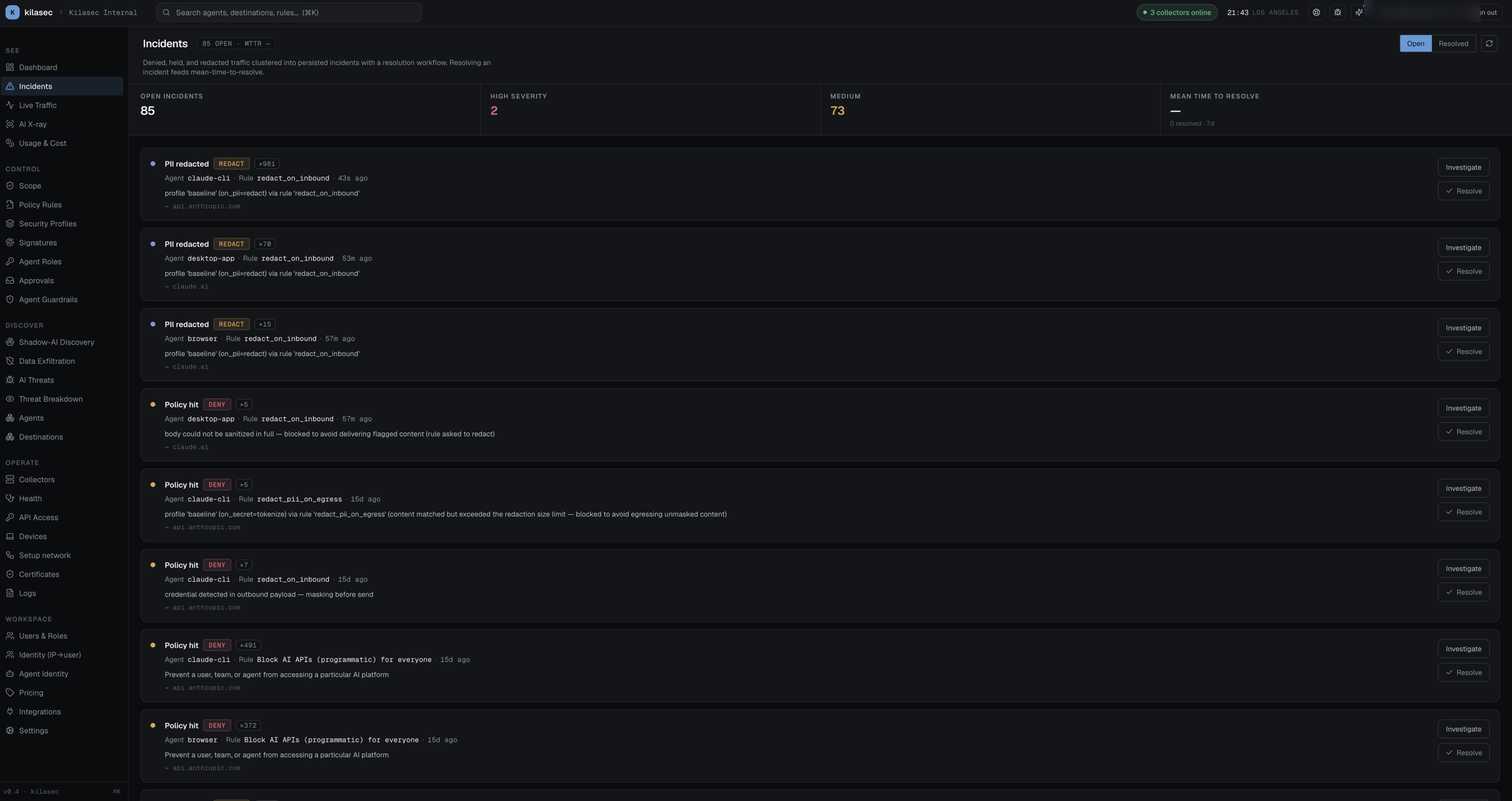
Investigating
Click Investigate on any panel → you're taken to Live Traffic with filters pre-applied for that incident's (agent, rule). From there:
- Skim the rows for the first occurrence — when did this start?
- Click any row to open the right drawer with the full request, the matched rule, and the surrounding context (last 8 decisions from the same agent).
- If the cluster is a false positive — the rule is too aggressive — edit the rule from the drawer's "matched rule" link, or disable it temporarily.
- If the cluster is real — the agent is misbehaving — note the agent name and source IP, take whatever action your runbook says.
Dismiss vs. Resolve
The page has two ways to clear an item from your view:
- Dismiss — soft hide. The cluster stays in the database; new events on the same
(agent, rule)will resurrect it. Useful for "I've looked at this and it's fine for now." - Mark all read — bulk-dismiss everything visible. Use when you've just finished a triage pass.
Neither action affects the underlying audit log. To make an incident not happen again, change the policy.
Inline payload preview — and what's safe to show
Each panel shows a small payload preview for context. Critical security guarantee: the cloud only ever sees fields that were already redacted by the collector. So when an incident panel shows:
POST api.openai.com/v1/messages
prompt: "debug: AWS_ACCESS_KEY=AKIA••••••XXXX AWS_SECRET=wJalr••••"
…you're seeing what the collector decided to ship after scrubbing — never the raw secret. The mask is applied at the customer's network boundary, before any of it crosses to kilasec.com.
If you want to see the original event (which never leaves the on-prem collector), query the collector's in-memory decision tail on the host: curl -H "Authorization: Bearer $AGENTFW_CLOUD_TOKEN" http://127.0.0.1:8000/audit. It holds the last 500 decisions with full request bodies; the on-disk audit.log.jsonl has approval-hold metadata only.
Severity, escalation, and pager integration
Each incident's severity drives:
- Red / amber / cyan color in the panel header.
- Sort order (high first).
- (When wired) Slack / PagerDuty notification rules.
Integrations to fire on high-severity incidents are configured on Integrations (currently a placeholder; webhooks land in v0.5).
Common incident types in the wild
"Unapproved AI tool" — Shadow AI cluster, one or more laptops attempted api.deepseek.com or similar. Either:
- Approve — add it to the allowlist (write a rule).
- Block — keep the deny in place, talk to the user.
"Credentials in prompt" — Secret-leak cluster. Usually a developer pasting a .env snippet into a chat. Real signal: someone's about to leak production creds. The default redact_secrets_on_egress rule masks these at the wire; if you want a hard block instead, add a contains_secret → deny rule above it.
"Cost spike" — A misconfigured agent making thousands of API calls. The dashboard's "Spend (today)" KPI catches it first; the Incident appears once a require_approval rule paused it. Resolve by capping its budget or revoking its API key.
"PII patterns sustained" — A consistent pattern of redactions from the same agent (e.g. support-bot-v2 redacts SSNs 200×/day). Not necessarily a problem — could just mean the bot is doing its job. But review periodically to confirm the bot's not exporting the redacted set somewhere it shouldn't.
→ Once you've resolved an incident with a rule change, ship the new rule as log first and check its matches in Live Traffic before enforcing — see Test before you enforce.