
Writing policy rules
A kilasec policy is an ordered list of rules. For each incoming AI request, the engine evaluates rules top-to-bottom and applies the first one that matches. (Iptables / Squid ACL semantics — first match wins, default action at the bottom catches anything not matched above.)
Looking for every field?
This page is the how-to. For an exhaustive, field-by-field reference of the rule editor — every tab, every option, and exactly how conditions combine when you fill in more than one — see Rule reference (every field).
The shape of a rule
In YAML — what you see if you open the Editor on Policy Rules:
- name: redact_pii_on_egress
  description: "Strip PII from outbound HTTP."
  enabled: true
  match:
    action: http_request
    destination: "*.external.com"
    contains_pii: true
  action: redact
  reason: "PII detected in egress payload"
  redact_fields:
    - body.card_number
    - body.ssn
Fields:
| Field | Required | Meaning |
|---|---|---|
name | yes | Unique identifier; shown in audit rows under decision.matched_rule. |
enabled | no | Default true. Disabled rules are skipped (kept for reference). |
description | no | Plain English. Render in the Editor / audit details. |
match | yes | The predicate. See match conditions below. |
action | yes | One of allow / log / redact / require_approval / deny. |
reason | no | Free-text shown to the admin and to the agent on deny. |
redact_fields | no | Dotted paths into the request body for redact. |
Match conditions
All conditions in a match block are AND-ed. A rule matches only when every listed condition matches.
| Condition | Type | Example |
|---|---|---|
agent | string or list | agent: research_bot or agent: [a, b, c] |
action | one of tool_call / http_request / llm_prompt | action: http_request |
destination | glob (host / tool / model) | destination: "*.openai.com" |
arg_regex | map of field → regex | arg_regex: { cmd: "rm\\s+-rf" } |
contains_pii | bool | contains_pii: true |
contains_secret | bool | contains_secret: true |
Globs in destination use shell-style * (one or more chars within a label) and ** (multiple labels). *.openai.com matches api.openai.com and chat.openai.com but not openai.com itself.
The five verdicts
| Verdict | Effect on the request | When to use |
|---|---|---|
allow | passes through unchanged | normal approved traffic |
log | passes through, audit row written | observability without enforcement |
redact | request body rewritten with masks before egress | sanitise PII / secrets / credentials |
require_approval | request blocked, queued on the Approvals page; resumes when human clicks Allow | external writes, expensive operations |
deny | request blocked, agent gets the reason string | unapproved providers, destructive commands |
→ See Concepts: Decisions & verdicts for what each does internally.
The default policy shipped to new tenants
New tenants start with default_action: allow and this rule set — visibility-first, so nothing legitimate breaks on day one while the risky patterns are caught:
- name: prod_db_needs_approval
  match: { destination: { host: production-db.internal }, action: [tool_call, sql_execute] }
  action: require_approval
  reason: writes to production-db require human approval

- name: redact_secrets_on_egress
  match: { contains_secret: true }
  action: redact
  reason: credential detected in outbound payload — masking before send

- name: redact_pii_on_egress
  match: { contains_pii: true }
  action: redact
  reason: PII detected in outbound payload — masking before send

- name: allow_approved_llms
  match: { destination: { model: [claude-sonnet-4-6, claude-opus-4-6, gpt-4o] }, action: llm_prompt }
  action: allow

- name: log_all_ai_chat
  match: { destination: { host: [chatgpt.com, claude.ai, gemini.google.com, perplexity.ai] } }
  action: log
Tune it to your posture: keep it visibility-first, or switch to default_action: deny and add explicit allow rules for a locked-down setup. The two redact_* rules mask secrets and PII at the wire out of the box; swap either to deny for a hard block.
Editing in the UI
The Editor page (/app/editor) gives you a form view alongside the YAML view:
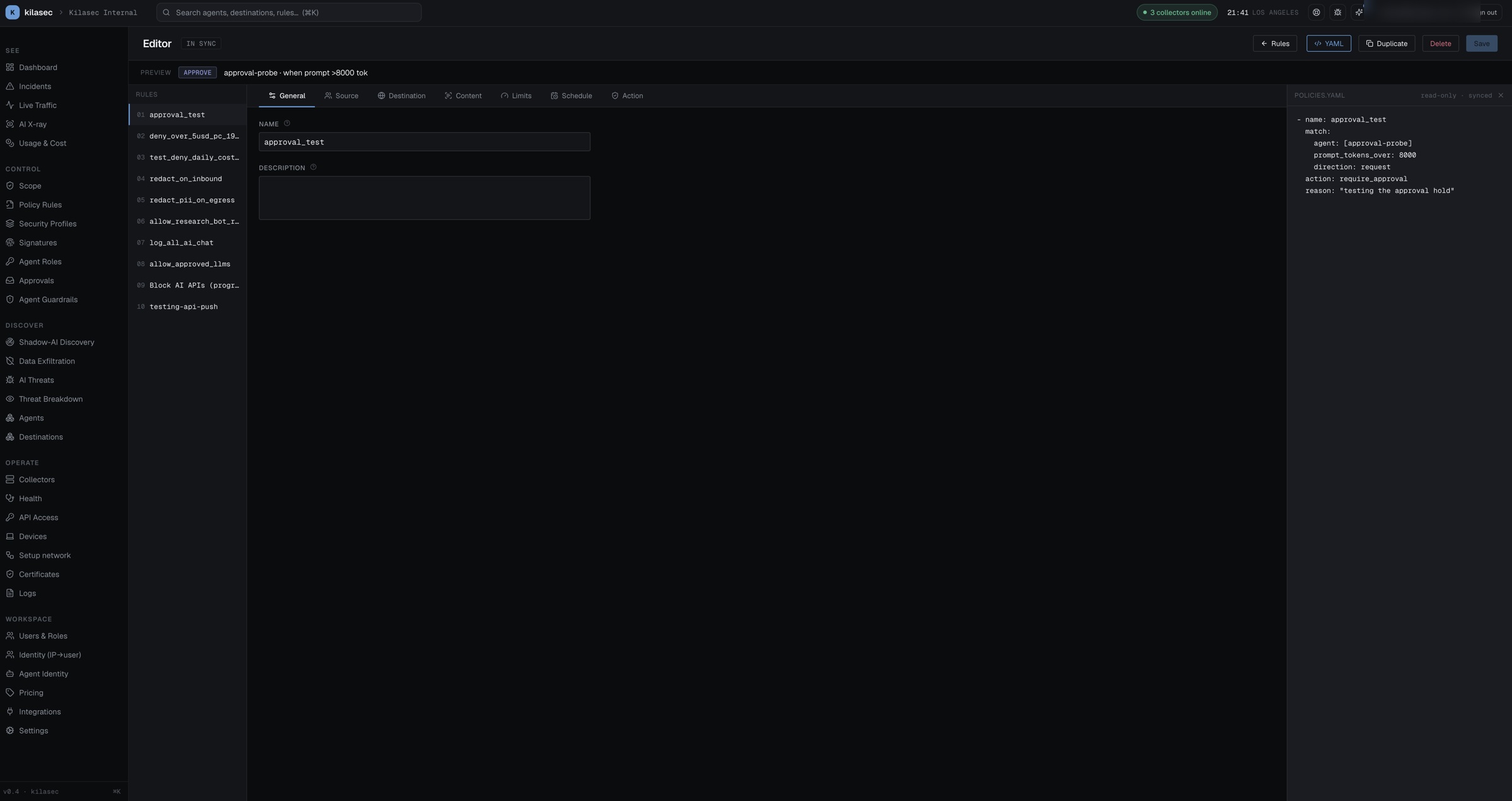
- Form is the right surface for most edits. It enforces shape and shows plain-English summaries of complex conditions.
- YAML is the right surface for hand-crafted regex, copy-paste into a PR review, or reading what's actually about to be saved.
- The Save button is disabled until the draft differs from the saved rule.
Reordering & disabling
- Drag a rule on Policy Rules to change priority; the engine re-reads the new order immediately.
- Toggle Enabled on any rule to switch it off without deleting. Useful for incident response — disable a rule that's misfiring, fix it, re-enable.
Audit trail
Every rule edit goes through PUT /v1/policy/rules/{name} (or POST for new, DELETE for remove). Every edit writes an audit row visible on Audit Log with who / what / when. Old YAML is preserved (git-style history) — restore a previous version with one click.
→ Once you've written a rule, ship it as log first and watch its matches in Live Traffic before enforcing — see Test before you enforce.