
Resolving approvals
When a rule's action is require_approval, the matched request is paused — the agent's call hangs, and the request appears on the Approvals page waiting for a human to decide.
What you see
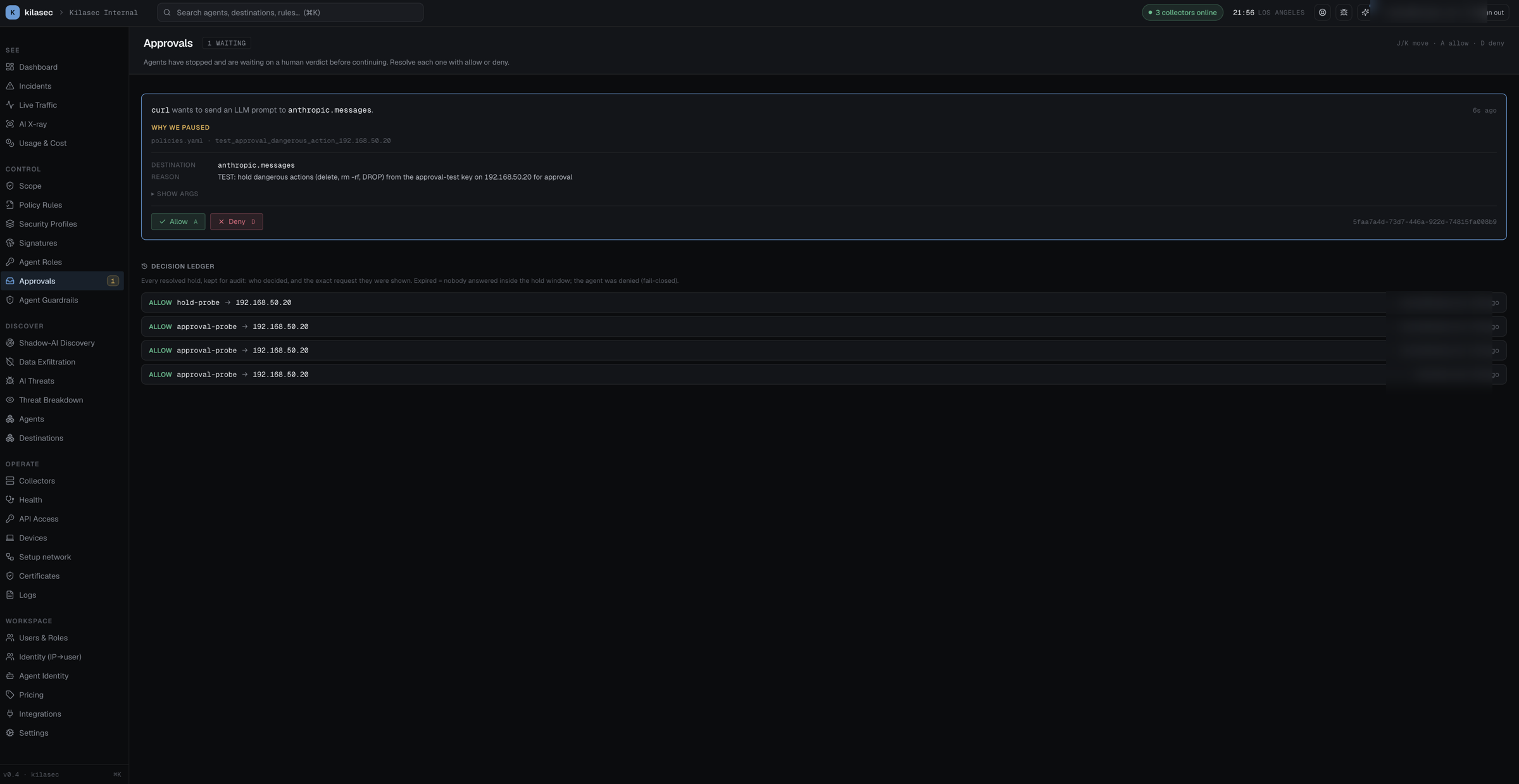
Each pending approval is a panel showing:
- The agent and destination (mono — copy-paste friendly).
- The rule that paused it (e.g.
prod_db_needs_approval). - Why we paused — the rule's
reasonfield, in plain English. - The arguments (collapsed by default; click "show args" to expand). Sensitive headers like
Authorizationare scrubbed before the audit row even reaches the cloud — but the body is intact for review. - Two buttons: Allow (
A) and Deny (D).
Resolving
Click Allow → the agent's hung call resumes, with verdict rewritten to allow. Click Deny → the call returns the configured failure to the agent, verdict stays deny.
The keyboard navigation matches the page header hint:
J / K— move between items.A— allow the focused item.D— deny the focused item.
Timeout
If nobody resolves within 60 seconds, the request fails closed — the agent gets a deny verdict with reason "approval timed out". The audit row records it as verdict=deny, reason=approval_timeout so you can grep for unattended queues later.
What's a good require_approval rule
The pattern is "expensive, irreversible, or untrusted":
- External writes — anything that creates / mutates / deletes on a third-party (POST/PUT/DELETE to api.notion.so, hooks.slack.com).
- Cost-bounded — an agent that's about to exceed a daily token budget.
- First-time provider — never-before-seen destination from this agent.
- High-blast-radius tools —
fs.writeto/etc/*,shell.execwith a non-trivial command.
Example:
- name: prod_db_needs_approval
  match:
    destination: { host: production-db.internal }
    action: [tool_call, sql_execute]
  action: require_approval
  reason: "writes to production-db require human approval"
Don't park approvals long
The Approvals queue is a work surface, not a queue of permanent decisions. Two patterns to keep it small:
- Approve → add a rule. If you've allowed the same kind of request three times in a row, write a rule that whitelists it. The Approvals page has a "+ Add rule" button on each panel that pre-fills the Editor with the matched request as a template.
- Deny → escalate. If you find yourself denying a class of request repeatedly, write a more specific deny so the agent gets the failure faster instead of hanging for 60 seconds.
What gets recorded
Every resolve writes to the audit log:
{
  "verdict": "allow",
  "rule": "prod_db_needs_approval",
  "reason": "human:pradeep@acme.com",
  "resolution_latency_ms": 4_812,
  ...
}
reason includes the user who clicked; resolution_latency_ms is the wall-clock delay between request and decision. Useful for setting timeouts and SLO reporting.
→ See Live Traffic for the full decision row, and the Audit Log for the immutable config trail.