
Install a collector
The collector is the on-prem half of kilasec. It runs on a LAN host (a small Linux box, VM, NUC, or Pi) and does three things:
- Data plane (
kilasec-dp) on:8080— terminates TLS for AI traffic routed through it, evaluates every request against your rules in-process, and enforces the verdict. It also listens on:8443for Kilasec Connect devices. - Management plane on
127.0.0.1:8000— loopback only: syncs policy and events with the cloud, holds approval requests, and serves the on-boxkilasecCLI. - PAC server on
:9443— serves the proxy auto-config so DHCP can hand it to clients automatically.
No raw payloads leave the customer's network. The cloud only sees the decision (with redaction already applied at the collector).
Requirements
| Minimum | |
|---|---|
| OS | Linux with systemd (amd64 or arm64). The installer is systemd-based — macOS is not supported as a collector host. |
| Docker | 24+ — installed automatically if missing (apt or dnf). Bring your own with --no-install-docker. |
| Network | outbound HTTPS to kilasec.com and ghcr.io; no inbound ports need opening |
| Memory | ~1 GB for a light load; 2 GB+ recommended |
| Storage | 2 GB for image + ~50 MB/day for local audit logs |
Check compatibility first (optional)
Before spending an enrollment code, run the read-only compatibility check — it verifies DNS, TLS to the cloud, Docker, and that ports 8080/9443 are free, and installs nothing:
curl -fsSL https://kilasec.com/install | sh -s -- --diagnoseOne-liner
The simplest path — paste this into a fresh shell on the collector host:
curl -fsSL https://kilasec.com/install | sh -s -- --enroll <enrollment-code>What that does, in order:
- Ensures Docker is present — installs it (apt/dnf) if missing. When run interactively it asks first; piped from
curlit proceeds automatically. Use--no-install-dockerto refuse. - Reads
--enroll <code>, POSTs it to/api/v1/collectors/enroll. - Receives a per-collector token + the registry creds for the docker image.
- Writes
/etc/kilasec/collector.env(mode 600). docker loginto GHCR, thendocker pull ghcr.io/blox-24/kilasec-collector.- Installs
kilasec-collector.serviceas a systemd unit, enables, starts. - Polls
/api/v1/collectors/{id}/statusuntil the cloud sees its first heartbeat (or 60s).
You'll see something like:
✓ enrolled with cloud (collector_id=col_4f81…)
✓ pulled image kilasec-collector:latest
✓ wrote /etc/systemd/system/kilasec-collector.service
✓ collector reachable at http://localhost:8080
✓ cloud sees the collector — you're online.
Manual install (no curl-to-shell)
If you don't want to pipe a shell script:
# 1. Enroll manually.
curl -X POST https://kilasec.com/api/v1/collectors/enroll \
  -H "Content-Type: application/json" \
  -d '{"code": "<enrollment-code>", "hostname": "'$(hostname)'", "platform": "linux"}'
# → {token, collector_id, registry: {user, password}, image}

# 2. Save the token (mode 600, root-only).
sudo install -d -m 700 /etc/kilasec
echo "AGENTFW_CLOUD_URL=https://kilasec.com"          | sudo tee /etc/kilasec/collector.env >/dev/null
echo "AGENTFW_CLOUD_TOKEN=<token-from-response>"     | sudo tee -a /etc/kilasec/collector.env >/dev/null
sudo chmod 600 /etc/kilasec/collector.env

# 3. Pull the image.
echo "<password>" | docker login ghcr.io -u <user> --password-stdin
docker pull ghcr.io/blox-24/kilasec-collector:latest

# 4. Run (host networking, so the collector sees real client IPs).
#    The container runs as uid 10001 and needs to own its data dir.
sudo install -d -o 10001 -g 10001 -m 700 /var/lib/kilasec
docker run -d --name kilasec-collector --restart always \
  --network host --ulimit nofile=65536:65536 \
  --cap-drop=ALL --security-opt=no-new-privileges --read-only \
  --tmpfs /tmp:size=64m \
  --tmpfs /run/kilasec:size=8m,mode=0700,uid=10001,gid=10001 \
  --env-file /etc/kilasec/collector.env \
  -v /var/lib/kilasec:/var/lib/kilasec \
  ghcr.io/blox-24/kilasec-collector:latest
Verify
# Reach the management plane locally (loopback-only):
curl http://127.0.0.1:8000/healthz
# {"ok": true, ...}

# Reach the proxy port from another LAN host:
curl --proxy http://<collector-ip>:8080 https://api.openai.com -o /dev/null -w "%{http_code}\n"
# 200 (or whatever; the point is the connection works)
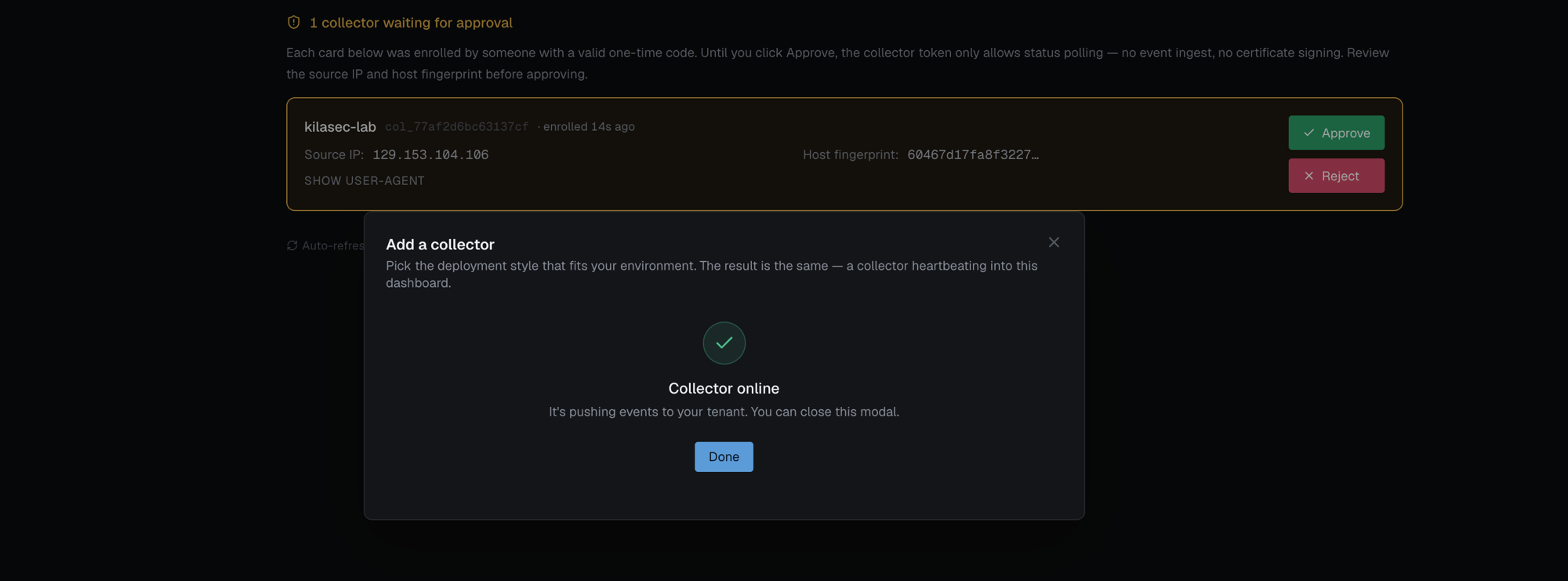
The collector should now appear on the cloud dashboard under Collectors with a fresh last_seen_at.
Where the collector keeps state
/var/lib/kilasec/.mitmproxy/— the collector's TLS-inspection CA (its intermediate under your tenant root, private key wrapped to this host). The directory and file name (mitmproxy-ca.pem) are historical; there is no mitmproxy process. Mount this volume so it survives container restarts./var/lib/kilasec/audit.log.jsonl— approval-hold decisions only (metadata, never bodies). The cloud holds the full decision history via ingest.
Common installer flags
--enroll <code>— one-time enrollment code from your kilasec admin.--name <label>— the name shown in the dashboard (defaults to the hostname).--force— re-enroll a host that is already enrolled as a collector. Without it the installer refuses rather than overwrite a working collector's configuration.--diagnose— run the read-only compatibility check and exit.--no-install-docker— fail instead of installing Docker.--approval-timeout <sec>— how long to wait for Approve in the dashboard (default 300).
Full list: CLI reference.
Troubleshoot on the box
Every collector ships the read-only kilasec CLI. Start with:
sudo docker exec kilasec-collector kilasec show status
sudo docker exec kilasec-collector kilasec test connectivity
test connectivity checks the data plane, CA, cloud reachability, token, clock, file descriptors, and disk, and prints an AFW-### code with the fix for anything that fails. kilasec request support-bundle writes a redacted tarball to attach to a support ticket.
Uninstall
Deleting a collector in the dashboard removes its cloud row and signals it to stop, but doesn't clean the host. To remove it from the machine — service, container, and state — run one command there:
curl -fsSL https://kilasec.com/uninstall | sudo shThat also clears the .shutdown sentinel a dashboard-deleted collector leaves behind, so the host is ready for a clean re-enroll. Add --keep-data to remove the service + container but leave /var/lib/kilasec and /etc/kilasec in place.
→ Once the collector is up, point traffic at it and watch Live Traffic.