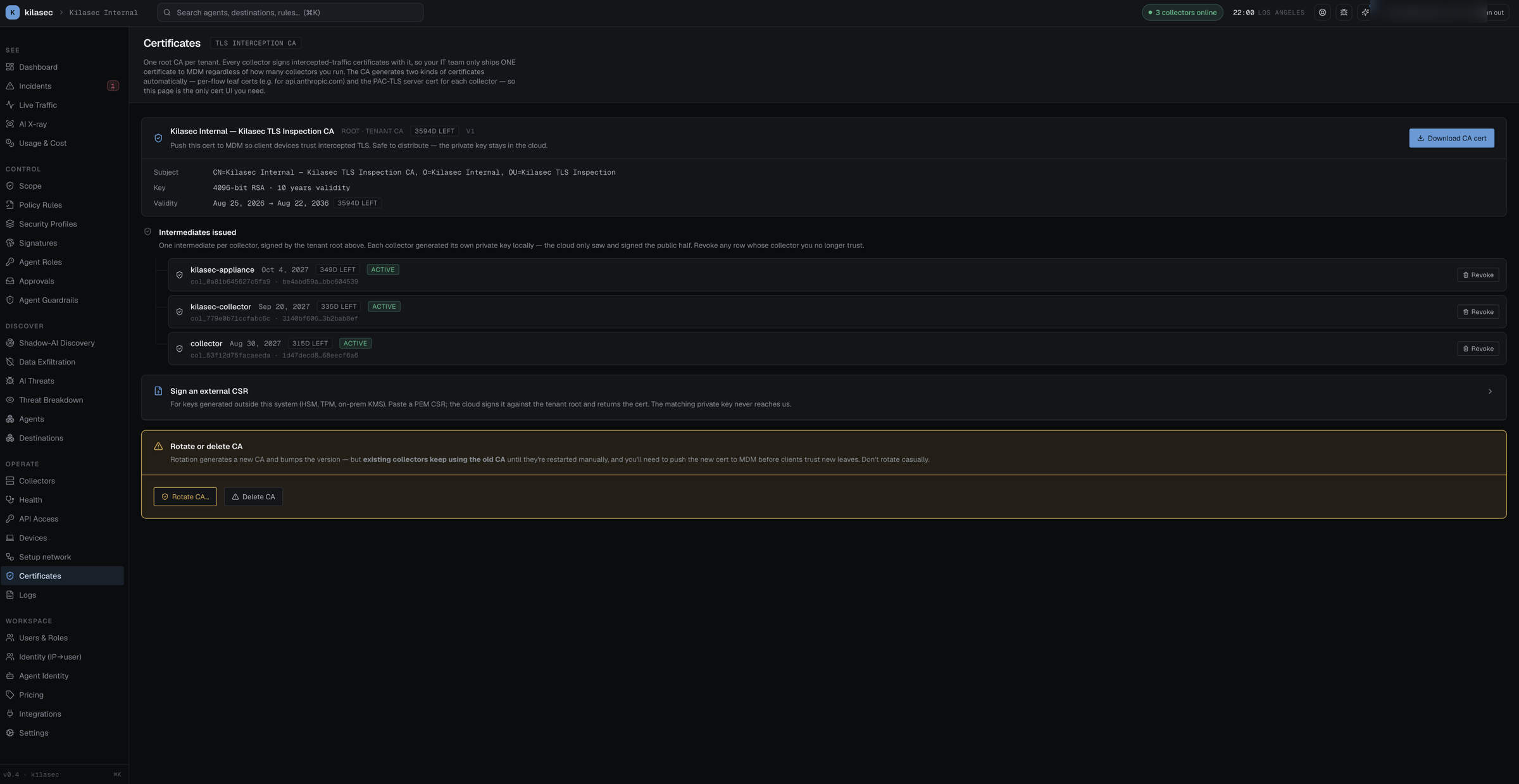
TLS Inspection tab
The tenant-wide inspection CA management surface (labeled Certificates in the sidebar). One root CA per tenant: an admin generates it here, every collector on the tenant pulls it on first boot and issues its interception certificates under it, and your IT team ships that one cert to MDM regardless of how many collectors you run.
The trust model, precisely:
- The tenant root CA is generated server-side and its private key is stored in the cloud — it never leaves it. The public cert is what you download and push to devices.
- Each collector generates its own private key locally and sends the cloud a CSR; the cloud signs it against the tenant root, producing one intermediate per collector. The collector's private key never leaves the collector.
- The collector's data plane (
kilasec-dp) signs a per-host leaf with its intermediate, so client devices only need to trust the single root.
What's on the page:
- Generate tenant CA (no-CA state) — form with Common Name, Organization / OU, Country / State / Locality, Email, validity in years, and key size (2048 or 4096-bit RSA). Generation runs server-side.
- CA panel (has-CA state) — subject, key size, validity window, expiry badge, version, and a Download CA cert button. The cert is safe to distribute; hand it to whoever runs your MDM.
- Intermediates issued — the chain of intermediates, rendered as a tree under the root: one row per collector with expiry and status (active / revoked / expired). Revoke any row whose collector you no longer trust: the cloud marks it revoked and the collector is issued a fresh intermediate on its next restart. There is no CRL yet, so clients keep trusting leaves from a revoked intermediate until it expires — if a collector's key may have leaked, rotate the tenant CA.
- Sign an external CSR — for keys generated outside the system (HSM, TPM, on-prem KMS): paste a PEM CSR, the cloud signs it against the tenant root and returns the cert + chain for download.
- Rotate / Delete CA — danger zone. Rotation bumps the version, but existing collectors keep using the old CA until they're restarted, and clients need the new cert pushed via MDM before they trust new leaves. Don't rotate casually.