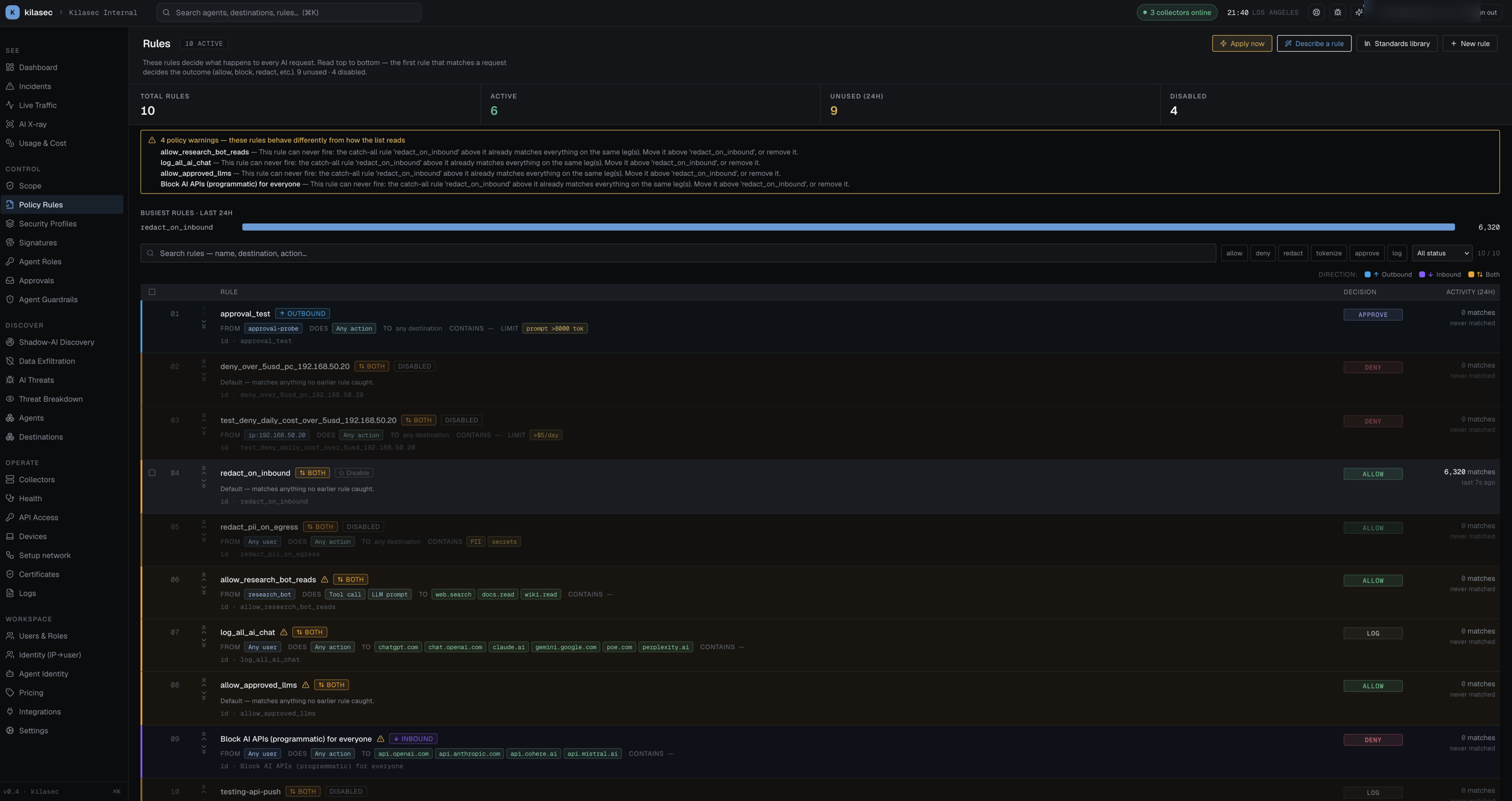
Policy Rules tab
The ordered list of rules the policy engine walks for every request — read top to bottom, first match wins.
- KPI strip — Total rules / Active / Unused (24h) / Disabled, with a "Busiest rules · last 24h" bar chart above the table.
- List view — columns: order number, a lock (built-in system rules) or grip icon, Rule (title, labelled from/does/to/contains match pills, internal id), Decision, and Activity (24h) with the match count + last-match time. Disabled rules dim and show a
disabledbadge. - Direction stripe — each row has a coloured left stripe, tint, and chip for the leg it inspects: Outbound (sky — the request going out), Inbound (violet — the reply coming back), or Both (amber — no direction set). A colour key sits above the list. Both is highlighted on purpose: a rule above it that covers only one leg does not shadow it on the other. See Two legs.
- Policy warnings — when a rule behaves differently from how the list reads, a banner at the top ("N policy warnings — these rules behave differently from how the list reads") names each flagged rule and why, and the row gets an alert icon (hover for the detail). The warnings re-check whenever you edit or reorder rules:
- Directionless access deny — a deny that matches only on destination / identity (agent, user, groups, workload, source IP) with no direction also runs on the reply, so a request-only allow above it won't stop it blocking the response. Set its direction to Request — outbound.
- Can never fire — a catch-all rule above it (no conditions besides direction) already decides every leg this rule covers. Move it up or remove it.
- Only fires on one leg — the catch-all above covers one leg, so this rule still runs on the other. Fine if intended; surprising if you expected it to apply to the whole call.
- Apply now — restarts your collectors so they pick up the latest rules (takes effect within ~15s).
- + New rule — opens the Editor with a blank draft.
- Click any row — opens the Editor on that rule.
For the rule grammar (match conditions, verdicts, default action), see Writing policy rules and Policy semantics.